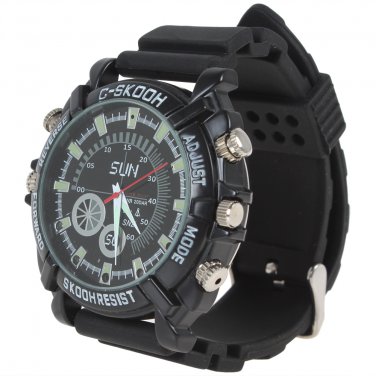
Specifications:
Function: Watch, Video-taking, Photographing and Recording
Main Features:
- Fashionable design, exquisite workmanship.
- Normal watch function, displays time in seconds, minutes and hours.
- Real-time clock adjustment.
- Waterproof, can be used as deep as 15m under the water.
- With infrared light, supports night vision, can record even in complete darkness.
- With hidden HD pinhole camera, can also be PC camera.
- Applied Scope: Meeting recording, Monitoring recording, Obtain evidence, Webcam, Family, Office, Corporation, School, outdoors, etc.
Memory Capacity: Built-in 8GB
Vision Angle: 90 degree
Built-in MIC: Yes
Video:
- Format: AVI
- Code: M-JPEG
- Resolution: 1920 x 1280
- Frame Rate: 30 fps
Image:
- Resolution: 4032 x 3024
- Format: JPG
- White Balance: Auto
Material:
- Bracelet: Rubber
- Dial: Stainless steel
Software: Operation system or major audio and video playback software
OS: Windows ME / 2000 / XP / 2003 / Vista , Mac os 10.4, Linux
Voltage: DC-5V
Data Transfer Interface: Mini 4 Pin USB
Battery: Li-ion Battery
Temperature:
- Operation: - 10 ~ 60 Degrees Celsius
- Storage: - 10 ~ 70 Degrees Celsius
Operating Humidity: 20 % ~ 80 % RH
Color: Black
After Sales Service: 1 Year Warranty
Package Include:
1 x Camera Watch
1 x USB cable
1 x Adapter
1 x CD
1 x User Manual
Operational Guidance:
Operation:
1. Video:
a. Press Button A until the blue light is burning.
b. Release the button.
c. The blue indicator will be off after it flashes three times within four seconds during recording video with audio.
d. Press Button A again, saving the file.
2. IR Indicator:
a. Start IR Indicator: In the status of recording Video with audio. Press the button C for about 5 seconds, then release it, the red indicator flashes three time.
b. Stop IR Indicator: Press and release button C for one time, the blue light will flashes three times. the IR Indicator is off.
3. Shooting an Image:
a. In the status of recording video with audio, press the Button A for two times, the blue indicator is burning.
b. Press the Button C for one time, the Red Indicator is burning.
c. Press the Button A for one time, the Red Indicator flashes one time. then shooting a picture successfully.
4. Sound Record:
a. In the status of Recording Video with Audio, press the Button A for two times, the blue indicator is burning.
b. Press the Button C for one time, the Red Indicator is burning.
c. Press the Button C again, for one time, the Red Indicator and Blue Indicator are burning at the same time
d. Press the Button A for one time, the Red Indicator and Blue Indicator will always flash alternately .
e. Press the Button A once again. Saving the Audio file.
5. Web Camera:
a. Turn on the item.
b. Connect camera and computer with original USB Cable.
c. Open the movable Disc in your computer.
d. Install driver for the PC camera function.
e. The Standard Camera sign will show on screen of computer.
Notice: If the computer can not recognize the camera, please try again.
6. Time Reset:
a. Handle Reset:
a. Turn off the device.
b. Connect the Camera to the computer with original USB Cable.
c. The Movable Disc will be shown on computer.
d. Open the Movable Disc.
e. Create a text file, Input 2012.01.24 13:30:30 Y.
f. Save the file as time.txt.
g. Secure delete the watch camera from the computer.
b. Auto Reset :
a. Turn off Camera.
b. Connect the Camera to the computer with original USB Cable.
c. The Movable Disc will be shown on computer.
d. Open the Movable Disc. Click the file WriteTime.exe in the folder of Movable Disc for two times.